This software was checked for viruses and was found to contain no viruses.
Click here
to see antivirus report.
Review
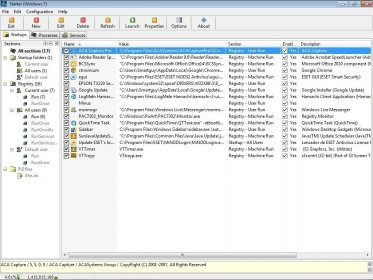
CodeStuff Starter is a startup manager for Windows.
This program allows you to view and manage all the programs and processes that start automatically with every operating system start up. This program displays the entries of everything that starts, divided in three categories: Startup Folders, Registry and INI Files. By clicking on them you will see some subcategories. If you click on them, the program will display the details about each entry, like name, value, section, and description.
You can then choose which entries will be enabled. This way you will control the memory used each time your computer starts, and you will enhance the speed of each start up.
As the program also shows all the processes that are running, you have the possibility to evaluate which of them can be turned of, because you don´t need them. If you need to do so, of course, you can also add any entry that you think it is necessary to execute some given process. The program allows to export the details to a text file, or import information from a text file.
It is absolutely free.
None.
Reviewed by: Daniel Ángel Romero
Reviewer rating:
Reviewed: 8 months ago
What's new in version 5.6
Enhanced Windows Vista compatibility.
Fixed too aggressive settings saving while swithing between main tabs (Startups, Processes, Services).
System memory graph was limited to 2 GB. Fixed.
Made large annoing tooltips for startup and service items to appear only at first column of the list.
Psapi.dll-related changes.
Updated supplied web links (Help\Useful links and context search menu items)
Updated NSIS-based installer to the latest version.
Other miscellaneous changes.
Translations update: New: Japanese, Serbian (Latin). Updated: Greek (Hellenic)
A true and trusted program that i have used for 5 years to make sure my computers are only starting
NECESSARY programs on startup. Can really save on RAM and startup times if you remove unnecessary
startup prgorams.
Using this programme one will have 100% control over what applications start up when you turn on
your computer. With out it your computer will be over loaded with running in the background
programmes that you do not need. Use it to free up space on your RAM chips. Thus making your
computer work more smoothly.